Examity Transcript (opens in a new window)
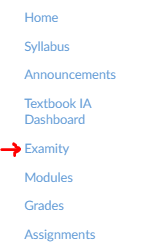
To take your Practice Quiz, first, go to the top of the course and click on "Examity", in blue, on the left-hand side of the screen.
Once you have clicked into Examity Dashboard, do the following:
Once you are logged in with the information you used to create your Examity profile at the beginning of the semester, follow these steps in the following PDF to take your exam: Canvas Test-taker Auto Proctoring Guide
If after going over the content in the PDF above, you are unable to get into your exam, try
If you still are having problems with your exam, email your instructor or TA for support.